
Every enquiry answered.Every patient followed up.
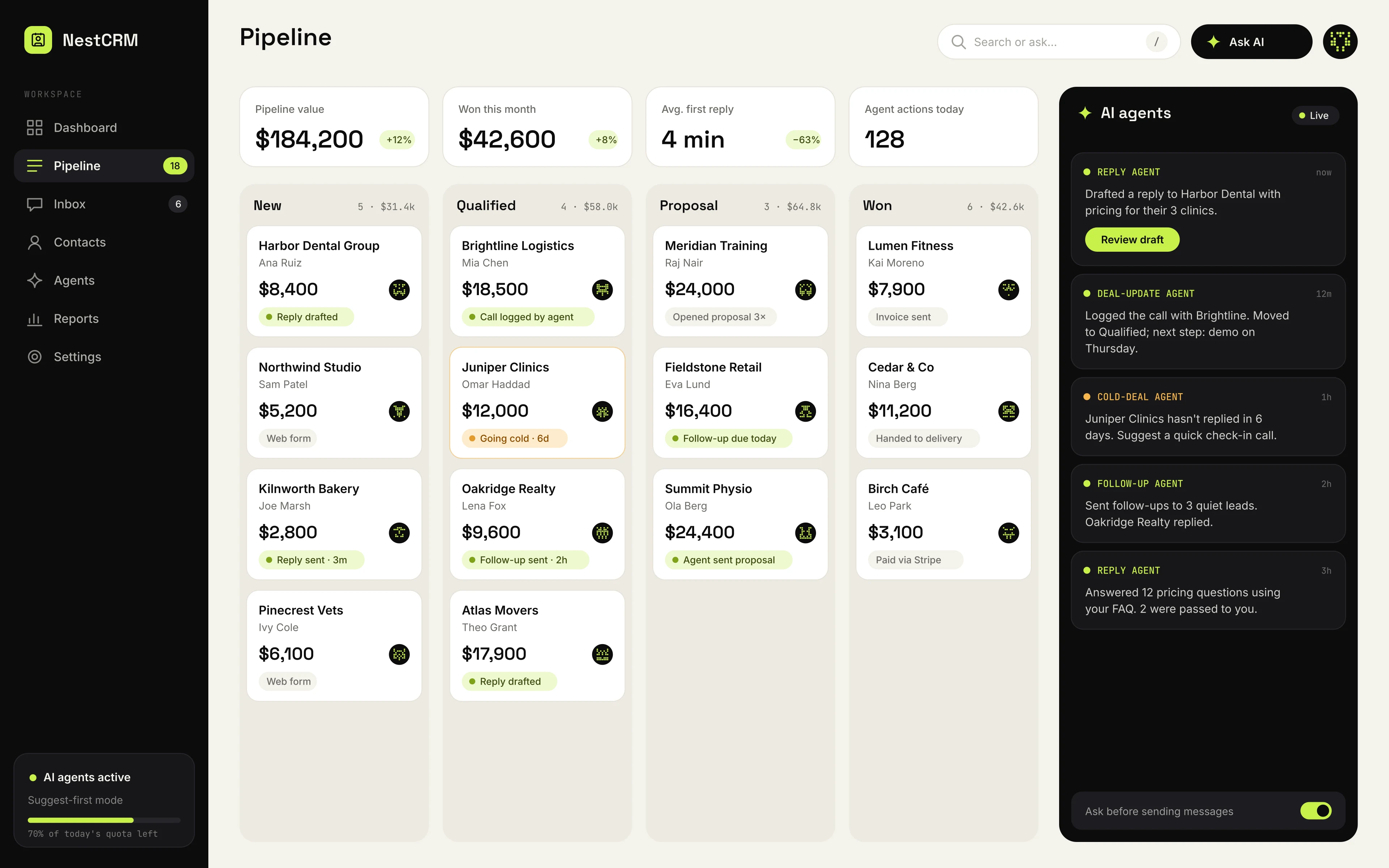
NestCRM brings your clinic's enquiries, bookings pipeline and follow-ups into one place. Then AI agents do the legwork: replying, chasing and keeping every record up to date, so no enquiry goes cold while your team is with patients.
Where sales quietly leak away.
Leads scattered everywhere
Enquiries arrive by email, chat, forms and phone, and live in personal inboxes and spreadsheets nobody else can see.
Follow-ups depend on memory
The deal goes cold not because the customer said no, but because nobody remembered to reply on Thursday.
Big CRMs take months to set up
Enterprise tools need consultants, training and custom fields before the team logs a single deal.
Paying for features you never use
Per-seat pricing and add-on modules make the bill grow faster than the team's actual use of it.
Agents that keep every deal moving.
NestCRM comes with AI agents that do the routine sales work in the background. They work from your prices, FAQs and pipeline, and your team decides how much they do alone.
Reply agent
Drafts answers to new enquiries from your price list, FAQs and past conversations, ready to send in one click.
Follow-up agent
Chases quiet leads with personal messages at the right moment, and stops as soon as they reply.
Deal-update agent
Reads call notes and email threads, logs what happened, and updates the deal's stage, value and next step.
Cold-deal agent
Spots deals going cold, like no reply, a missed meeting or a stage that has stalled, and tells the owner what to do next.
You stay in control.
Start with agents that only suggest. Let them act alone on routine steps once you trust them.
- Approve messages before they send
- Choose which steps agents handle alone
- Every agent action logged with the reason
- Your data is never used to train shared models
Built to sell, not just to store contacts.
One inbox for every channel
Email, website forms, WhatsApp and Telegram enquiries land in one shared inbox and become leads automatically.
AI agents on every deal
Agents draft replies, chase quiet leads, log calls and emails, and flag deals going cold. You choose what they do alone.
Drag-and-drop pipeline
See every deal by stage, value and owner. Move a card and the right tasks and reminders follow.
Follow-ups on autopilot
Sequences and reminders schedule themselves, so no lead waits because someone forgot.
No-code automations
Build if-this-then-that rules visually: assign leads, update stages, notify the team or call a webhook.
Reports that answer questions
Conversion by stage, reply times, revenue forecasts and team performance, without exporting to a spreadsheet.
From first message to signed deal.
Watch the two-minute tour, then step through a lead's journey one stage at a time.
Everything a small sales team needs.
Contacts and companies
Full history of every conversation, deal and file.
Lead scoring
Rank leads by activity and fit, so hot ones come first.
Tasks and calendar
Calls, meetings and to-dos linked to each deal.
Email templates
Reusable messages with personal fields filled in.
Web forms
Embeddable forms that create leads directly.
Bulk messaging
Send updates and offers to filtered contact lists.
Quotes and invoices
Create and send quotes from a deal in a few clicks.
Roles and permissions
Control who sees, edits and exports what.
Activity log
A record of who changed what and when.
Custom fields
Track the details that matter to your business.
Mobile app
Check the pipeline and reply to leads on the go.
Multiple teams
Separate pipelines for branches or product lines.
Works with the tools you already use.
Channels
Email
Connect Gmail or Outlook inboxes.
WhatsApp
Chat with customers from inside the CRM.
Telegram
Bot and chat messages become leads.
Website forms
Embed forms or connect existing ones.
Nest suite
NestHub
Coming soon: one login across every Nest app.
NestChat
Calls and chats from the AI front desk arrive as enquiries.
NestBoard
Coming soon: turn a won deal into a project board.
NestFinance
Coming soon: send invoices and track payments.
Business tools
Google Workspace
Calendar and contacts sync.
Stripe
Payment links and paid-invoice updates.
n8n and Make
Connect anything else with webhooks.
Open API
Build your own integrations.
Moving from another CRM or a spreadsheet?
We'll import your data for you, free, during setup.
- Contacts and companies
- Deals and pipeline stages
- Notes and activity history
- Tasks and reminders
- Custom fields
Made for clinics that run on enquiries.
Dental clinics
- Treatment enquiries in one place
- Follow-ups until they book
- Recall reminders
Fewer enquiries lost after the first call.
Medical practices
- Every channel in one inbox
- Fast replies with AI drafts
- Clinical questions routed to staff
Reception spends less time on the phone.
Physio and therapy
- Course-of-treatment tracking
- Rebooking nudges
- Reports by referral source
Patients finish the treatment they started.
Aesthetics and vet clinics
- Consultation follow-ups
- Reminders before appointments
- Repeat-visit tracking
More consultations turned into bookings.
What do slow replies cost you?
Leads contacted quickly are far more likely to buy. Enter your numbers to see a rough estimate of the revenue that slips away each month.
Estimated revenue lost each month
$9,000
Illustrative estimate only. It assumes a share of deals is lost as reply time grows (0% under 5 minutes, up to 40% after a day). Your real numbers will differ.
Questions about NestCRM.
How long does setup take?
Most teams are up and running within a day: connect your channels, import contacts and set up your pipeline stages. We help with all of it.
Do I need my own AI account or key?
No. The AI agents are included. During early access we agree a usage allowance with each clinic.
Do the AI agents act on their own?
Only where you allow it. By default agents draft and suggest, and your team approves. You can let them handle routine steps on their own, like a reminder or logging a call, and every action is recorded with the reason.
Can you move our data from another CRM?
Yes. We import contacts, deals, notes and tasks from spreadsheets or your current CRM for free during setup.
What does early access mean?
NestCRM is in beta. We onboard a small number of clinics, set everything up with you, and improve it based on how you use it. You can export your data at any time.
Who owns our data?
You do. You can export everything at any time, and we never use your data to train shared AI models.
Founding-clinic pricing.
NestCRM is in beta. Instead of fixed plans, early clinics get a guided pilot and pricing based on their size, locked in for as long as they stay.
What early clinics get
- Personal setup and data import
- Founding-clinic pricing, locked in
- A direct line to the team building it
- A say in what we build next
Public pricing will be announced when NestCRM leaves beta.
Stop losing enquiries.Book a demo.
NestCRM is in early access for clinics. We'll show you around, import your contacts and set up your pipeline with you.